Elastic Load Balancer
Elastic Load Balancing automatically distributes your incoming traffic across multiple targets, such as EC2 instances, containers, and IP addresses, in one or more Availability Zones. It monitors the health of its registered targets, and routes traffic only to the healthy targets. Elastic Load Balancing scales your load balancer capacity automatically in response to changes in incoming traffic.
There are 3 types of load balancer service:
- Application Load Balancer: work on Layer 7 (application layer) in OSI model. It can read all the information in the request, so it supports path-based routing, and can route requests to one or more ports on each container instance in your cluster.
- Network Load Balancer: work on Layer 4 (transport layer). It can handle millions of requests per second.
- Gateway Load Balancer: enable you to deploy, scale, and manage virtual appliances, such as firewalls, intrusion detection and prevention systems, and deep packet inspection systems.
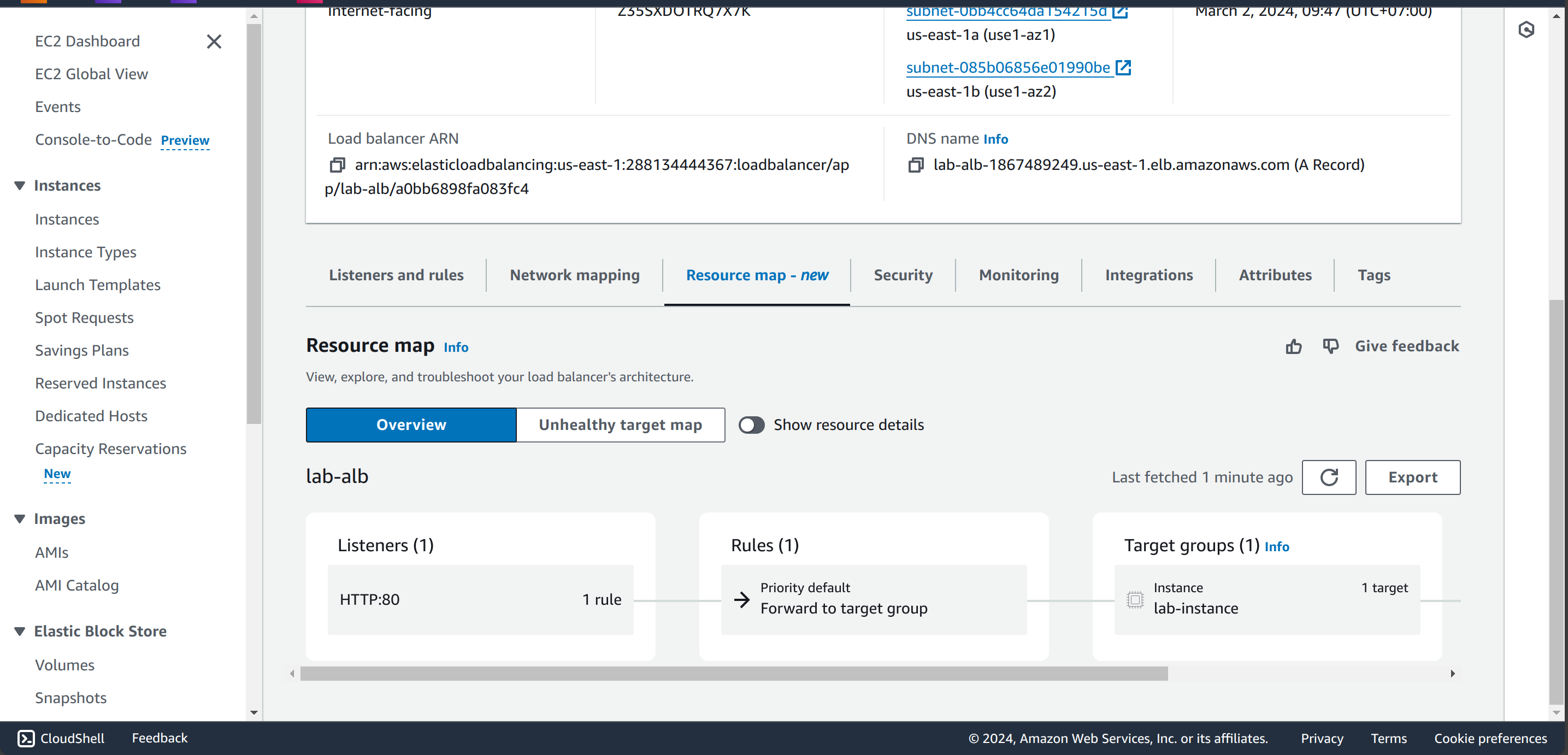
In this lab, I will setup an Application Load Balancer in our VPC and route traffic to ASG’s instances. The ALB has internet-facing, so it will be deployed on public subnets and have Security Group allow route traffic to instance’s Security Group.
This script creates a Application Load Balancer, target group to ASG and listener rule for HTTP traffic from internet, S3 bucket to save access logs, which helps you trace the logs later.
############### Application Load Balancer ###############
resource "aws_lb" "lab_alb" {
  name               = "lab-alb"
  internal           = false
  load_balancer_type = "application"
  security_groups    = [module.alb_sg.security_group_id]
  subnets            = module.vpc.public_subnets

  enable_deletion_protection = true

  access_logs {
    bucket  = module.s3_bucket_for_logs.s3_bucket_id
    prefix  = ""
    enabled = true
  }
}

resource "aws_lb_target_group" "lab_instance" {
  name     = "lab-instance"
  port     = 80
  protocol = "HTTP"
  vpc_id   = module.vpc.vpc_id
}


resource "aws_lb_listener" "demo-alb-listener" {
  load_balancer_arn = aws_lb.lab_alb.arn
  port              = 80
  protocol          = "HTTP"

  default_action {
    type             = "forward"
    target_group_arn = aws_lb_target_group.lab_instance.arn
  }
}

resource "aws_autoscaling_attachment" "web_asg_attachment" {
  autoscaling_group_name = aws_autoscaling_group.web_asg.id
  lb_target_group_arn    = aws_lb_target_group.lab_instance.arn
}
For S3 bucket log, the resource.random_pet block will create a random name, which help you create a unique name for your bucket, sometimes the bucket name can be overlapped, you can explicit set the name.
S3 bucket
############### S3 ###############
resource "random_pet" "s3_bucket" {}

module "s3_bucket_for_logs" {
  source = "terraform-aws-modules/s3-bucket/aws"

  bucket = "my-s3-bucket-for-logs-lab-${random_pet.s3_bucket.id}"
  acl    = "log-delivery-write"

  # Allow deletion of non-empty bucket
  force_destroy = true

  control_object_ownership = true
  object_ownership         = "ObjectWriter"

  attach_elb_log_delivery_policy = true # Required for ALB logs
  attach_lb_log_delivery_policy  = true # Required for ALB/NLB logs
}
Note: attach_elb_log_delivery_policy and attach_lb_log_delivery_policy are predefined rules for allowing ALB permission to write log to S3 bucket.
which policy you can see in Console:
{
    "Version": "2012-10-17",
    "Statement": [
        {
            "Sid": "ELBRegionUs-East-1",
            "Effect": "Allow",
            "Principal": {
                "AWS": "arn:aws:iam::127311923021:root"
            },
            "Action": "s3:PutObject",
            "Resource": "arn:aws:s3:::my-s3-bucket-for-logs-lab-concise-snapper/*"
        },
        {
            "Effect": "Allow",
            "Principal": {
                "Service": "logdelivery.elasticloadbalancing.amazonaws.com"
            },
            "Action": "s3:PutObject",
            "Resource": "arn:aws:s3:::my-s3-bucket-for-logs-lab-concise-snapper/*"
        },
        {
            "Sid": "AWSLogDeliveryWrite",
            "Effect": "Allow",
            "Principal": {
                "Service": "delivery.logs.amazonaws.com"
            },
            "Action": "s3:PutObject",
            "Resource": "arn:aws:s3:::my-s3-bucket-for-logs-lab-concise-snapper/*",
            "Condition": {
                "StringEquals": {
                    "s3:x-amz-acl": "bucket-owner-full-control"
                }
            }
        },
        {
            "Sid": "AWSLogDeliveryAclCheck",
            "Effect": "Allow",
            "Principal": {
                "Service": "delivery.logs.amazonaws.com"
            },
            "Action": [
                "s3:ListBucket",
                "s3:GetBucketAcl"
            ],
            "Resource": "arn:aws:s3:::my-s3-bucket-for-logs-lab-concise-snapper"
        }
    ]
}
Result in Console: